Friday, January 28, 2011

EDM 310 Students Please Read!

Dear students, I know you have been assigned to leave a comment on this blog. Unfortunately I rarely post to it. If you would like to find newer posts to comment on you should try:

At the Teacher's Desk

or

Education Debate

Sorry about the inconvenience, I just don't use this forum that often.

Wm Chamberlain  

Monday, November 15, 2010

What Was That?


Does this make SNL relevant again?

Sunday, August 29, 2010

Week 1 Reflections Jr. High

The first weeks of school are always difficult, but this last week seemed to be even harder than normal. For reasons out of my control I didn't have much time to get mentally prepared for this school year and I have felt extremely lost so far. Here are a few things I need to work on:

1) I need to continue using my planning time for planning classes and thinking about students. I know this sounds obvious, but I spend a lot of time "helping" others with their technology and sometimes it takes up too much of my time.

2) I suck at "hurry up and wait". Not sure what I can do about this except smile more.

3) Team teaching is not something to enter into lightly, especially if there is no opportunity to plan with the teacher you will be working with. I am taking lead this week, the other teacher is actually the expert in the field. I should know a lot more about how well this is going to work very soon.

4) I was very active in trying to develop relationships with my students, especially the new students. I need to keep this up. When I am with the students I need to be actively engaged with them.

5) It is really nice to have a group of students that have been with me for several years. There was no awkward time when we were trying to get to know each other. It was one thing that really helped me keep from stressing out last week.

Next week's goal:

I am teaching math for the first time in about 8 years. I want very much to make the time I teach (this is the co-teaching class) a learning experience for all the students. I am going to find real world situations where using angles is important.

Thursday, August 26, 2010

Reflections on My First Week of Teaching EDUC 210 Technology for Teachers

I am requiring my EDUC 210 students to write a reflection from each weeks readings and class discussion. Obviously I need to model this as well. Here is the top three things I learned from the first class:

1. I talked way too much. I need to allow time for conversations to develop, and not to dominate the group time. While it is true that I have a lot of experience (and a lot of opinions) this class is not about me. I can't get to know my students if I don't let them talk.

2. Developing a one hour a day class is much different than developing a one night a week class. I need to better anticipate difficulties my students may have. For example, when a student at school has a problem in class. We can find the solution the next day. When I have a similar problem with the night class, that student will have to wait a week for help unless we can sort it out through a call or email.

3. A group of pre-service teachers can really get me excited. Who doesn't want to talk shop with people so excited about what they want to do?

I am really excited for the next class. Now that I have the first one down and I feel much better prepared for the next one, I am ready to jump back in and share and learn together.

Thursday, August 19, 2010

Quinci's First Day


Here is Quinci talking about her first day at school. I'm glad she decided she wants to go back!

Around the World Multiplication


This video shows students playing "Around the World" with multiplication. This is a flash card drill game where students compete to travel around the circle. To start the game two students race to answer the multiplication (or any other kind of flash card) problem. The winner moves to the next student around the circle and race them. When the winner loses they sit in the new winner's seat. The game continues going around the circle until one student ends up at the seat they started at. The students seemed to really enjoy the game.

Thursday, July 8, 2010

Documents To Go for the iPad

Documents To Go Premium is an iPad/iTouch/iPhone app that promises the ability to import and export office documents. The $15 price tag kept me from buying this app until now because I was sure I could find a cheaper way to do what I wanted, import/export Gdocs.

I am moving all my documents from Microsoft Office because I want an easily accessible cloud based repository for my work. Since I want my iPad to be my main carrying machine while I am at school and home I want it to work well with Gdocs.


The splash page is very pretty and gives a quick idea about the types of files it will work with.


The start page is pretty sparse and easy to navigate. It shows files you can go to and recent files that you have opened. Easy for quickly finding the doc you were working on before.


You can set up Documents To Go to sync with several online sites including GDocs, Box.net, Dropbox, and iDisk. I set up Dropbox and it created a folder inside my Dropbox folder for it.


Then I set up my GDocs account. Both were very easy to set up. Next I decided to try and open a few documents I already made. I had no problem opening a xml document. I could even open up a Google Presentation. I did come up with a big problem though, none of my word processing docs would open up. The only thing I could think of was maybe there was a problem with my settings in Gdocs. Sure enough when I switched back from the new version of Gdocs (which allows simultaneous editing) it started to work again. This is a hassle, but since I don't have many instances where I need simultaneous editing I can live with it.

Documents To Go also allows you to open documents in a desktop file created when I synced my iPad to my Macbook. I assume it will do the same thing with a pc as well.


I also downloaded a syncable app for my Mac that allows me to sync over wifi without having to doc which is a big perk.


You can also create MS Word, Excel, and Powerpoint documents from the app. Creating a Word doc is pretty easy and functional as well although I haven't had time to see if the formatting holds up when saved and opened by MS Word or through GDocs. I'm not a spreadsheet guy so my need for and use of the Excel doc creator will be extremely limited. The Powerpoint doc creator is very basic with only a few templates. You can also send an email with attachments.


The program allows me to save into the Documents To Go folder, Dropbox, and most importantly for me GDocs!

While I am sure I will find a lot of different quirks and problems (such as an annoying Coco error with some of the docs in my Gdoc collection) I think that this program will be very functional for me. I won't know for a few months if the money was well spent. Tomorrow Google could allow the iPad to have native access to GDocs and the need for this app would almost disappear. As of now, it seems to be the best (only?) option I have to upload, download, create, and save GDocs from my iPad.

Special thanks to Peter McAsh, @pmcash, for inspiring this post.

Wednesday, April 28, 2010

Reflectings of Comments4Kids

I am writing a blog post for the I Heart Ed Tech Blog Swap and would like it to be about how #comments4kids has made an impact on student blogging over the past year. If you have an anecdote or comment that you wouldn't mind me using please leave it in the comments.

Sunday, February 28, 2010

Great Tool: Google Alerts

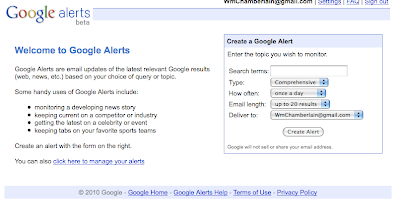
Google Alerts is a great way to keep track of what is going on online. If you have a Gmail account you can set up an alert for a specific term and Google will email you when that term is posted on the internet. You can set it up to email you immediately or less often.


You can manage your alerts and change their settings or even delete them.


This is what the alert email looks like. It puts the key term in bold so you can see how it is used in context.

Why would you want to set up an alert? If you are like me, you want to know when you are being discussed on the internet. Another great way to use it is to see if someone is talking about your blog, wiki, podcast or other content you have created and posted online.

I love to use it to see who is posting about a pet project of mine: #comments4kids.

Thursday, February 25, 2010

Cooking With Jacob:Independent Research Projects Can Foster Learning

My digital media class has been tasked with doing an independent learning project. The only guidelines I have given them is to find something they are interested in and to record their learning in some digital form. The purpose of the assignment is to allow them to have a little fun with their learning. (Believe it or not I do have the option of doing something strictly for fun!)
The students have the opportunity to choose any digital tool to help them. One of my students, Jacob, chose to use a wiki to record what he is doing. The wiki, titled Cooking With Jacob, reflects Jacob's new interest in food (a subject I hold near and dear to my stomach!) He has started to record recipies he is collecting.
I have encouraged my students to use audio, video, and pictures for recording learning to go along with text because they are so engaging to the audience. Jacob came into my lab yesterday and grabbed our digital camera and tripod to record a presentation he was making in speech. Here is the video he recorded and posted on his wiki:
Isn't this what we are looking for as educators? Not only do we see the integration of technology into the speech class, but more importantly we see learning being connected through two different classrooms. When I changed jobs my biggest goal was for my class was to allow students to use digital tools to reflect what they are learning in their content areas. Yesterday a student took the first step.

Monday, February 22, 2010

Check Out Kidblog.org

Kidblog.org may be just what the teacher ordered, especially for students under 13 years of age. I have spent many years looking for a way for my under 13 students to create content on the internet with limited success. Most sites require a person be 13 years or older before they can create an account. If they create an account under 13 they break the TOS (terms of service) which means their account could be suspended or deleted.

Kidblog allows teachers to create class blogs for their students under 13 in a very easy way. After a teacher signs up for an account and create their blog, they can simply add the students name and password. When the student goes to the blog site, there is a drop down menu for their name and they only have to enter their password.

Another great feature of the site is that both comments and posts can be moderated. For those of you that have students that are beginning their online experience and may be inclined to share too much information or those who might want to start flaming others this is a must.

The major drawback to the site is that it has no customization options. You can't add the great widgets, slideshows, or plug-ins you may be used to. You can't even change the template or colors.

Despite the drawbacks, I think Kidblog is a great way to introduce new teachers and new students into blogging. While it does lack some functionality, it will definitely hit the spot for many students and teachers.

Sunday, February 21, 2010

Adding Streaming Video to Your Blog

After reading Miles Webb's, @NZWaikato, post on adding video to your blog, I decided to take up his challenge about how to stream video. First let me say this can be a very controversial subject. It seems that many educators, teachers and administration, are hesitant to open up their classrooms to public scrutiny. This is not a decision to enter into lightly. If you are interested in my story, here is a link to a post I wrote about it.

The first thing I need to address is the purpose of streaming the video. I stream video in my class so that others can see what we are doing. With a back channel, I can use the video to have a conversation with others outside my classroom. I also stream video to share specific things we are doing in class. I also use the streamed video to record events that I can post to my blogs.

Step 1, secure permission of your administration and, if necessary, parents. Our districts policies require parents to "opt-out" of being included in media. Since this includes year book, pictures for newspapers, news stories, etc. this has not been a problem. Since our district implemented the policy we only had one parent ask for their student to not participate.

Step 2, Get a camera. It is possible to use a cheap web cam without sound to an expensive camcorder that has video and audio out. I use a cheap no-name webcam in my Digital Media Center, a nice Creative webcam that is audio capable in my classroom, and an old Sony Steady Shot camcorder for video and Blue Snowball microphone for church.

If you just want to stream video without audio, don't spend a lot of money on a webcam. The video quality will be fine. If you want to record your video with or without audio using your computer you will want to invest in a high end web cam or an inexpensive camcorder. I use my camcorder with video out through the firewire port and import it into my bottom end Mac book. This gives me great video. I don't like the adio quality as well so I purchased a Blue Snowball to import the audio and it has made a noticeable difference.

Something to consider when choosing a web cam or camcorder is what will you use it for. Camcorders have the most flexibility but they cost the most. Webcams are usually inexpensive, but they have to be tethered to the computer. A seperate microphone can not only improve audio quality, but it also gives you a good tool to record audio. Here is a link to audio my students created in my class.

Step 3, choose your streaming site. I use Ustream.com to stream my video. It has several options I like including an optional chat. Here is a link to a post where I explain how I used Ustream to stream and record a presentation in my classroom with the chat enabled. There is also Stickam, and Mogulus. I periodically go back to these to see if they have improved enough or added new functions that may cause me to switch.

Step 4, start streaming. I can stream video and audio and record it with Ustream. I can place the streaming video on a blog, wiki, or a static page like Google sites using embeddable code. I can also do the same with the recorded video. This gives you lots of options.

Finally, here are some things you may want to consider streaming live: athletic events, musical events, teacher trainings, a class lesson, student presentations, science experiments, a student creating art, visitor presentations, awards assemblies, or, if you are crazy like me, everything.

If you are interested in streaming, but needs more information, don't hesitate to ask.

Friday, February 19, 2010

A Lesson in Copyright

A few days ago pictures started to appear in my moderation que on my 7th grade class Ning. Two of my students had found a site that had pictures they liked from the Manga series Vampire Knight. Not wanting to break copyright law I deleted the pictures and talked to my classes about copyright, creative commons, and how to ask for permission to use copyrighted images.

One of the students that had posted the pictures wanted to ask for permission to post the pictures so I had her bring in a copy of her book to get the publisher's information. The book was published by Viz Media LLC.

I went to their website and found an online form to fill out.

I had Hou type on the form and ask for permission to post the pictures.

I like the Vampire Knight to put on my blog.....but my teacher wants me to ask permission if i could put it on my blog.
-Houa


Then I added:

My student was posting pictures found on websites from the Vampire Knight series. I would not allow them to be posted because we don't have the right to publish these pictures. We decided to contact you and ask for permission.

The site she would like to post the pictures on is at: http://noelclassof2011.ning.com/

Thank you for your attention to this matter,

-Wm Chamberlain
Noel Elementary School
Noel, Missouri

It isn't enough to discuss copyright with our students, we need to help them find solutions to copyright issues. While I don't know if we will be given permission to post these pictures I do know that Houa has learned how to ask instead of just take. The process is more important than the outcome.

Tuesday, February 9, 2010

Creating Digital Video Reflections

I have been meaning to do this all year, but things don't always happen on my time table. Today I finally finished setting up my Digital Video Reflection area. My plan has been to have a place where students can jump in and make a quick video where they talk about their learning and then post it to their blog or the class ning. I believe that reflections is the most important step in the learning process and I want to be able to facilitate it in my school.

Why did I set this up when students are perfectly capable of writing their reflections? The answer is simple, because it is awesome! Let's face it, we live in media rich culture. Why read when we can see a picture; why see a picture when we can watch a video?

Why put up the students reflections where they can be seen by others? The same reason I write these posts, because I want people to see them, reflect on them, and hopefully leave a comment. My students want their learning validated just like I want to have my learning validated.

Here is my set-up. I use a Logitech webcam mounted on a tripod (with masking tape) to get enough elevation for the picture. The webcam is hooked up to my laptop along with my Blue Snowball microphone. Although the sound is not as loud with the Snowball, the students don't have to wear the headphone/microphone combo.

I set up a barrier so that the student recording wouldn't feel watched as they create their videos. It is hard for many to put themselves "out there" with their recordings and this can help them feel more comfortable.

This shot is from the back. I put the screen behind the student so it looks a little nicer than the wall/window combination. I plan on getting a few more screens to place around to cut down on the background noise and to make the student more comfortable. It looks raw, but if you have ever been to a television station before, only what shows on the camera matters.

Here is Yessy doing the first video reflection on the new set-up. She does an amazing job with her explanation. After she was finished I had her post the video on the seventh grade class ning. It will be used as an excellent example for the other students to emulate.

I would love to be able to set up a station like this in each classroom so that students would have access to them all the time. Imagine students having a Youtube channel that is devoted to what they are learning!


Thursday, November 19, 2009

It Is Time to Stop Looking at My Classroom and Start Looking at the School Community

I am very fortunate to have some of my work included in William' Kist's book, The Socially Networked Classroom. I have just started reading it and am enjoying it very much. Thinking about what I have read has made me start to think about my school.

I have spent a lot of time and effort on my classroom. I have invested countless hours in working through the how and why for many different technology tools. I have posted over 500 blog entries and commented hundreds of times on other blogs. I have learned and shared a vast amount of new information that has truly helped me look at education in a new way. I have transformed my classroom in the last five years.

As I walk down the halls I see the difference in the amount of technology the teachers and students have access to now. There are projectors in all classrooms and IWB's in almost all of them. Most teachers have laptops now and we have an open wireless network. Anyone can get online at anytime in our school. Teachers have access to digital cameras and webcams. The one minor problem we have right now is some cranky server software and not enough broadband access to the internet.

As I look back over the past five years I wonder where we will be in another five. Will students be carrying laptops and netbooks? Will we finally allow them to use smart phones in class? Will our textbooks be digital instead of paper? All of these questions will of course be answered in time.

The one question that is most important has nothing to do with hardware or software. It is the one thing I can control: How will my school change for the better because I am here?

I can no longer hide in my classroom and work between the encompassing four walls. I now have more responsibility to both the teachers and students in my building. I need to seriously consider what I need to emphasize. My view has to broaden and encompass a much larger mission.

This is a new focus for me. In the past I succeed or fail on my own merits. The impact is much smaller because of the fewer number of students I had access to. Now my decisions impact ten times that number.

I don't know what direction I am heading. I have already encouraged the increased use of class blogs with other teachers. I know we are progressing as a school, but the rate of speed with a large group is so much slower than with an individual. I really need to make sure that anything I bring to the school as a whole is very important for our school community. I don't have the luxury of experimenting with a small group anymore.

Wednesday, October 28, 2009

How to Get (and Keep) More Visitors


I received the above comment from a student in Mr. Miller's class. Mr. Miller told his class they would stop getting homework if they reached 2,500 hits on their class blog. Click here for an update. Make sure you stop by and add another hit to the map!

I left a comment on the blog with the below advice. I have expanded some of it. The original comment is in bold.

1) I have been blogging for three years and the hits add up. I have not changed my blog address in three years so it makes it easier for people to find me after a long period of time.

It is difficult to get attention from the education world for your blog because of the lack of teachers using technology and/or the lack of access to technology in the classrooms. There also seems to be a lot of ed tech "experts" that talk about how important it is for students to use tech tools, but they don't spend much time or attention visiting or promoting students' work.

2) I post regularly so that people have a reason to come back often. This is critical. I want to have a new post up at least every day or two. It seems like many times I will go days without posting and then I have two or three entries. With Blogger I can schedule posts to take place at a later time which I use often to help space out my posts. When I look at the blogs I follow on my site, I am much more likely to visit one that has newish content.

3) The title of my posts have words that people search for using search engines like Google. If your titles are not descriptive enough people won't find them in a search. I know for a fact that most of my hits come from Google. People search for specific things and if your titles are specific you will get more hits. I use Feedjit to see where my visitors come from and how they get there. For example, I have a post on the BBC website Dance Mat Typing. If you Google BBC typing I currently come in fifth on the list.

4) I comment on lots of others blogs. When I comment I make sure it is positive and relevant. Don't write something like, "Nice post", write instead, "I really like the way you used descriptive adjectives in your story." or "That is a great science project! When I teach that subject I will do this activity too. I also do __________ when I teach this." I started the comments4kids meme on twitter to encourage leaving comments on students' blogs, a by product of that is the ability to link back to our own blog. We receive a lot of hits and comments from blogs we leave comments on.

I am sure there are lots of other things that help. If you know of any please post it in a comment below.

Tuesday, October 20, 2009

Teachers Need to Become Social Networking Experts

I tweeted the below message this morning after having a conversation with my junior high math teacher. She had been sick yesterday and looked pretty pale today. She had planned on students working in the lab today testing, but most had finished the day before. Since she was obviously not feeling good, I volunteered to put something on my blog that the students finished with the testing could do. After asking her what she was covering, probability, I did what any 2.0 teacher would do, I went to Twitter for help.

Within a few minutes I started receiving suggestions from my network.

Obviously, covering for another teacher is not an unusual occurrence, we have all done that. What makes this more unique is that the people that helped the math teacher out did not even know her. Several of the wonderful teachers that responded haven't even had a lengthy conversation with me. They just saw a need and filled it.

This is obviously a positive pln story, but it really is much more. This is really a small hint of what we will soon see in education. Teachers need to evolve to being social networking experts. Students will look to us for our ability to link them to what they want (need) to learn. We will no longer be expected to be experts in content or tools. We will need to be experts in creating paths from learners to knowledge.

I have a new job this year. I have three hours a day to help facilitate technology into our school. While I have been teaching teachers (and students) tools, I find that the best learning experiences come from connecting students and teachers to sources they can learn from.

We have had several experiences this year that have made for some great experiences for my students and for others. Dear Kia: Voicethread and Video helps recount a wonderful teachable moment that started with simple question by a student commenting on a child's blog (something I consider to be incredibly transformative for my students). Mrs. Baker and Mrs. Whittier Skype Meeting recounts two classes sharing culture using Skype. Mrs. Whittier's Spanish class wanted to know what school was like in Mexico and we have students that have attended school in Mexico. In How to Speak Chuukese Part 1 we took a problem, a small population of students that spoke only Chuukese, and decided to create some videos to help others that may have the same problem.

What made these experiences possible was the connections I have made through blogging, commenting on blogs, and Twitter. I created no content but simply connected my students to learning opportunities. You better start making connections too if you want your students to have these opportunities.

Tuesday, October 13, 2009

It Is Imperative We Help Our Students Create a Positive Digital Portfolio

I was sitting at the Donald W. Reynolds football stadium on the campus of the University of Arkansas Saturday afternoon watching the jumbotron "Pig Screen". When I noticed it showing people in the stands. While this is a normal occurrence at the football games, and I have been to plenty to know, this time I was struck by the students and children that were being shown. I like to watch them show people in the crowd because many (especially students) do some funny and sometimes incredibly stupid things. That made me reflect on something I have been contemplating for a while.

What digital artifacts are our students creating? I see on television or the internet stories like the riot that took place in Chicago ending with the murder of Derrion Albert, with that being recorded on a cell phone. I see a bus video of a student in an altercation with a bus driver. I see kids video (cell phone again) the assault of a young lady by several other young ladies. These are artifacts that not only make us sick, but also relay a message that young people are violent, aggressive, and dangerous.

Not only are the students in these videos tainted by their actions (with good reason), but all students have to carry some of that burden as well. There are plenty of education sites that show students in a positive light such as At the Fireplace, Beyond the Rainbow, East Dragon Den, Little Voices, Little Scholars, Room 8 Melville, and Saigon South International School Blog. While these and many, many more showcase positive experiences students are having, they really don't help individual students create that digital portfolio that will follow them throught the next few years. My class blog reflects me much more than my students.

Facebook is a perfect example of how the digital trails students create can come back to haunt them. Here is an article about how roomates are perceived by the parents of college students. Here is an article about the perils of adding stupid content to your Facebook page. While I don't believe we can teach the stupid out of some actions our students will do, perhaps a strong digital portfolio will help others see them as more rounded individuals. Who wants the only information about them on line to be about how much they like to party and get drunk?

How can we help our students create personal spaces that can help them record not only their learning, but also pieces of themeselves on line? Obviously, the answer is we must encourage our students to create and save digital content whether it be audio, video, writing, or a mash up of the three at some centralized spot that can be found later by them, future employers, or even by colleges and universities. What are you doing to help your students create their own positivie on line identity?

Friday, September 18, 2009

Using Skype to Connect ESOL Students with Foreign Language Students

Last Tuesday I facilitated a Skype conference call between Mrs. Baker's ESOL class and Mrs. Whittier's Spanish class. Unfortunately, I had duty in the morning and had limited time to set up the equipment.

I used a logitech usb webcam for the video feed feed and a Blue Snowball usb microphone for audio. The laptop is a Dell Vostro 1500 with 2 gigabytes of ram. We used the screen on the laptop for the video. We also used the built in speakers on the laptop for sound.We were using our wireless access for the internet. I wanted Mrs. Baker's students to be in their room so Mrs. Whittier's class could see the class environment.

There are several things I plan to change for the next Skype call. The first is making sure I have powered audio. We had a difficult time hearing Mrs. Whittier's students through the excited chatting. The second would be to run the video through a projector. Although the video stream isn't exactly great, it would still make it easier for the students to watch. I would also change from our webcam to my digital camcorder with my macbook. Our video stream would improve greatly that way.

To record the Skype call next time I will use CamStudio (Thanks to the recommendation by Eric Langhorst!). I had planned on using Jing Pro, but realized too late that it would only record 5 minutes of video. Obviously, this meant I did not get any screen capture video of our meeting :<. If you are planning on doing a conference call, here are some things to think about. Make sure you have an alternate (non internet) means of contacting the people you are skyping. I would suggest a phone number. See this post for how I learned that lesson. Also, do a practice call so the bugs can be worked out. I was having problems with my Snowball microphone on our practice call and had time to find a solution before the actual call.


Here is the view the students had of the call.
Here you can see Mrs. Whittier on the screen.

Notice how the students were focused on the other class.Here is a screen capture of Mrs. Whittier's class waving goodbye at the end of the call. You can see our video feed in the bottom right corner.


Here is some video. Plese forgive the poor quality.


I was very pleased with content of the meeting. Mrs. Whittier's class wanted to learn about schools in Mexico. We have several students that have attended schools in Mexico so they were very valuable resources. Mrs. Whittier also wanted her students to have authentic experiences with the Spanish language. They had the opportunity through the call to talk to native Spanish speakers.

In return, Mrs. Baker's students had the opportunity to learn about school in Virginia. The school Mrs. Whittier teaches at the Fredericksburg Academy is a private school that is very different from our school. Our students learned about some of those differences, but also learned that both groups of students had many similarities.

Overall, I thought the meeting went extremely well and we plan to continue the conversation later in the year. If you would like your class to skype with one of our 3-8 classes, feel free to contact me and we will set it up!

Friday, September 11, 2009

Robert Burns Haunts Me

The best laid schemes o' mice an' men Gang aft agley...
from Robert Burn's To a Mouse

Today was supposed to be a big day. The true beginning of my part time technology facilitation job. Today I was supposed to have a class from another state skype in to learn from students in our ESOL program. Mrs. Baker, the ESOL teacher, and I were really excited and ready for the experience. Her students had practiced speaking in front of an audience to prepare. Everything was ready to go, and then......


The electricity flickers once, twice, and then goes down for the eight count. Not a problem, there was still 50 minutes until the appointed time. I was sure it would be fixed pretty quickly. It is unusual for our power outages to be more than 5 or 10 minutes.

After 20 I start to think, "Mrs. Whittier doesn't know we have no electricity and I can't tweet or skype....." I try to call my wife but get the voicemail. Irritated I hang up and immediately get a message that that I have a voice message. Yup, I had called my own phone.... I called home again and found out electricity was out there too. No help there.

I go to my office to think. Walking in the dooor I have another idea, a friend and former colleague is now principal at another school in the district. I can have him log into my skype account and send a message. I quickly find the school's number and call but he is not in the office and they can't contact him.

Suddenly I realized I had the solution in my pocket....I can send a direct message from my cell phone using texting!

But Mouse, you are not alone, In proving foresight may be vain:

Robert Burn's To a Mouse

I immediately text D: @capohanka my schoolhas no electricity can't do skype today dm me back if u get this please

I follow that with D: @vwhittier we have no electricity at school and won't be able to skype in please dm me if u get this i will get it on my cell

Success!

I received these messages back on my phone. Thank goodness I have my dm's set to text me!


I was feeling pretty good about myself, I had solved the problem and could finally quit worrying about letting Mrs. Whittier know we wouldn't be able to skype in. Then I get this:

The purpose of my story is to point out that thinks don't always work out as we plan them. Had I not realized I could contact Mrs. Whittier she would have had her class ready to go and would not be able to explain why the call wasn't happening. I know that she would have been put in an awkward position through no fault of her own. In the future, I will make sure to get a phone number that I can call in case something comes up unexpectedly so that I won't leave anyone in that position.

By the way, our electricity came back up about 7 minutes before the call was scheduled. This might have been enough time to actually get things set up and make the call, but when we started up the server it wouldn't load properly due to an IP problem, but that is another story....